Many people spend their days sitting in front of a computer, whether at work, at home, studying, gaming, streaming, taking online courses, or in their free time. But how to sit at it properly?
Good computer positioning is the key to avoiding subsequent headaches, neck and back pain. If you too spend a lot of time on the computer, read the following article to find out how to position your monitor correctly
Rules to follow
In addition to the correct height and angle of the monitor, it is advisable to think about the distance from the eyes. If you use an external screen, it should be placed at least 50 cm away from the eyes.
To avoid eye pain, it is also a good idea to focus your eyes on an object at least 6 metres away every 20 minutes or so, or to take a long look at the green or the sky in the distance. There are also glasses with holes to train your eyes to focus.
The ideal option when working on a laptop are ergonomic stands, with which you can adjust the correct position of the monitor. Desks are often lower than you need them to be so you don't hurt your back. Therefore, if your monitor cannot be placed at the desired height, it is best to place your laptop on a stand. MISURA ERGO has a variety of different types on offer depending on purpose, price, and composition
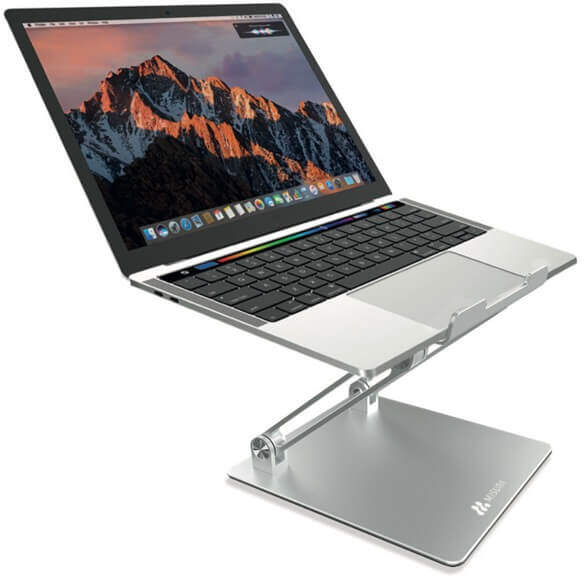
Ergonomic stand design for back, spine and eye health
As already mentioned, to avoid back, muscle and eye problems when working over a laptop or computer screen for long periods of time, it is ideal to get a suitable chair, and an ergonomic stand to avoid round backs, and an awkward viewing angle. As can be seen in the picture on the right
Ideal are the sliding lightweight folding stands, of which we have several in the MISURA range. You can take them with you everywhere.
Working at the computer requires ergonomic stands
In recent decades, there has been a massive shift from manual work to sedentary work in offices behind a computer. However, in the long term this leads to a one-sided strain on the human body in the back, neck and neck, muscle stiffness and deterioration of vision due to blue light. The immediate consequence can be reduced performance or even long-term incapacity of employees. An ergonomically designed screen workplace can effectively prevent such undesirable phenomena and at the same time ensure higher employee motivation.
Adjustable sliding stands
Which ergonomic stands from the MISURA range are suitable and have an adjustable height that can also be adapted to your eye height? This will relieve strained wrists and necks and you won't have to bend over the monitor as much. From our wide range of MISURA ERGO you will surely find a choice.
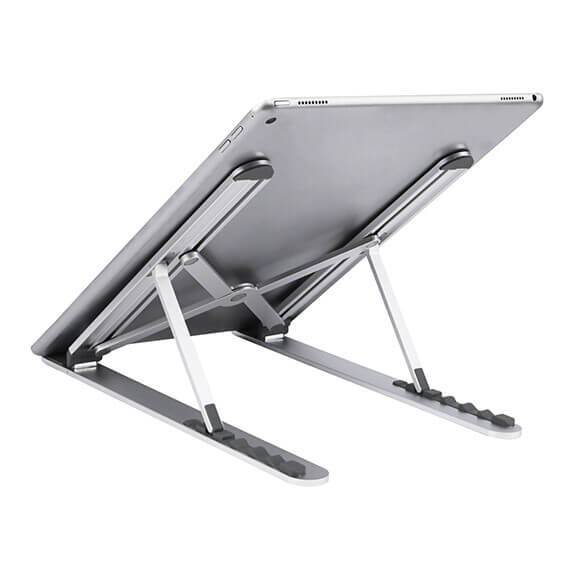
MISURA ERGO offers different types of stands
- NOTEBOOK STANDS M01 Overheating protection, easy to carry, non-slip surface and quality materials.
- NOTEBOOK STANDS M04 Universal stand for all types of laptops or tablets with non-slip stops. To relieve neck and shoulder fatigue Adjustable height 55 to 147 mm. 6 adjustable positions
- NOTEBOOK STAND ME12 Holds any size laptop thanks to adjustable height from 87 to 170 mm. It is very strong and stable. It is made of high quality material and will last a long time
- Laptop stands M07 Easy adjustment of the lift - six positions. Non-slip surface, extremely stable. CNC cut edges for greater user safety. Compatible with all laptops and tablets.
- ME10 laptop stands
- NOTEBOOK STANDS M03 For all types of notebook or tablet. High quality materials have been used for the production of the stand. Helps relieve neck and shoulder fatigue. Books can also be placed in the MISURA stand. Easy to carry.
- NOTEBOOK STANDS M05 Compatible with all laptops and tablets Reduces strain on your entire body, neck, back and wrists. Light weight - easy to carry. Overheating protection - significantly increases airflow around the laptop
- NOTEBOOK STANDS M11 Fully flexible adjustment of stroke and tilt angle. For laptops 15.6" and smaller. Non-slip surface. Height adjustable from 4.5 cm to 36 cm-
- NOTEBOOK STANDS M09 Fully adjustable stroke position and tilt angle, designed for laptops up to 15.6" and smaller has a non-slip surface. Easy to carry.
Many people spend their days sitting in front of a computer, whether at work, at home, studying, gaming, streaming, taking online courses, or in their...
Recently, a new type of massage device has come to the attention of society, and that is the massage gun. Many people think that this type of massage...
Working from home or homeoffice has become almost the working standard of today for various office occupations after two years of commodification. Whether...